RLM
Partnering with Salesforce to speed up quote-to-cash within the newly launched RLM.
Year
2024
Role
UX/UI, Product Manager
Opportunity
Foxit had already proven itself in the Salesforce ecosystem with DocGen and eSign. These products were carving market share from DocuSign, Conga, and other incumbents who charged a premium for clunky tools. Users often stuck around begrudgingly without another reasonable option.
Understanding this frustration, Salesforce wanted to partner with us. Their vision: show a new contracting experience inside their Revenue Lifecycle Management (RLM) product. From quote to cash, faster. That meant a contract approval workflow sitting natively inside Salesforce, powered by Foxit’s eSign and other technolgies.
My Role
I was both Product Manager and UI Designer. The Foxit design team was at capacity, and I had the skills to cover. I wrote the brief, ran the research, and owned the backlog. I created wireframes and high-fidelity, dev-ready designs in Figma. I also worked directly with engineers, writing sprint tickets, unblocking dependencies, and planning delivery.
Our team was spread across Australia, India, Ireland, and the US. Different time zones meant I had to keep documentation sharp and over-communicate decisions.
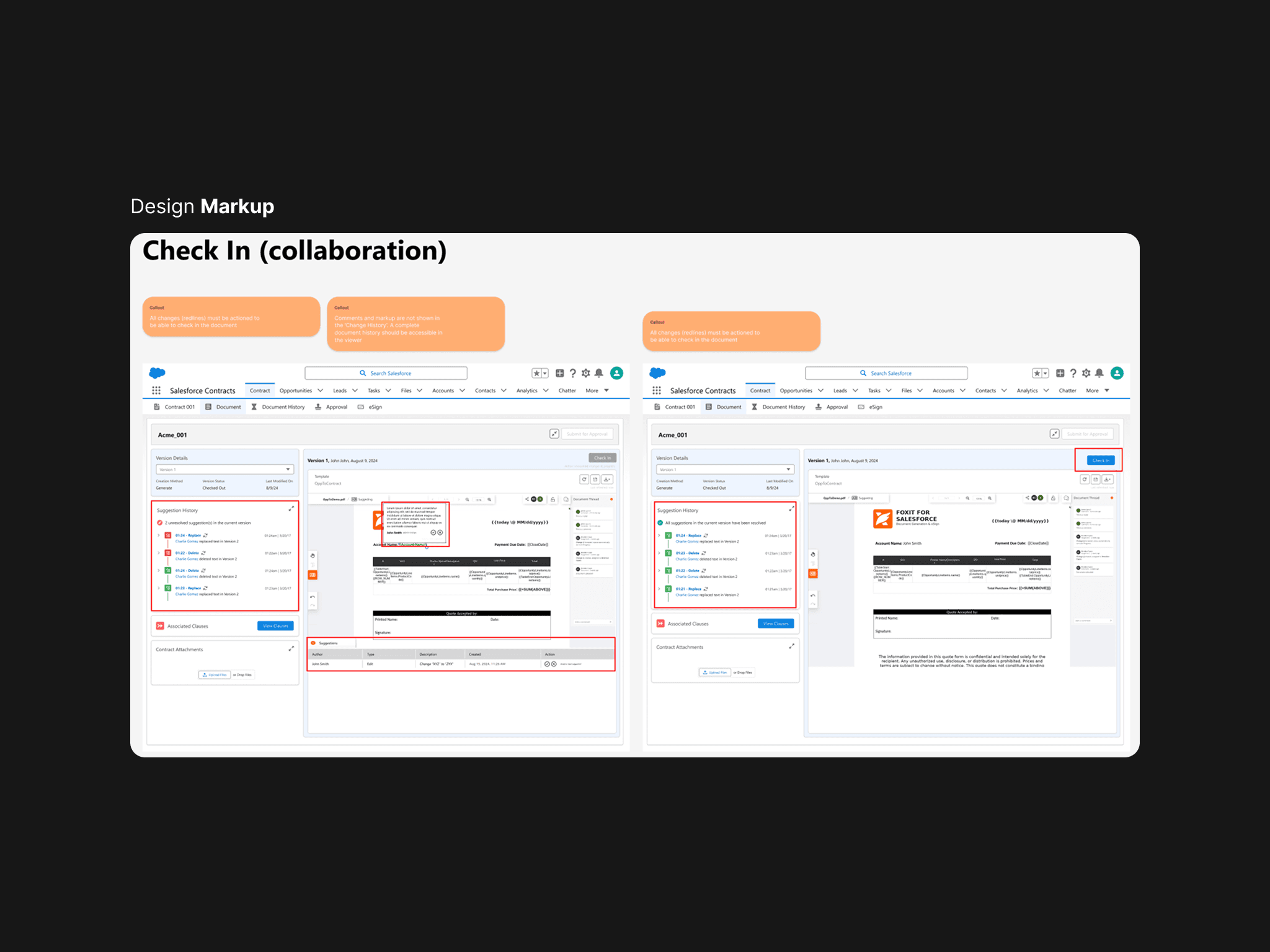
Short on time and in distributed timezones, all designs were marked with notes on desired functionality
Approach / Process
1. Framing the brief
We started by breaking down Salesforce’s ask: a contracting environment within RLM, using Foxit’s eSign and other technology as the core engine. I mapped the flow of how contracts are created, edited, signed, and approved. We pulled in SMEs to validate what mattered most in real-world contracting.
2. Studying the market
I analysed the big players (DocuSign, Conga, Ironclad) focusing on how users draft, redline, and finalise contracts. Their flows were powerful but slow, often designed for admins rather than salespeople. This gave us a target to keep the UX as minimal and purpose-driven as possible, ensuring the process remains secure and compliant, without any extra bells and whistles.
3. Designing the end-to-end flow
I sketched the journey from draft to approval, then built wireframes showing every step: starting a contract, editing, sending for review, capturing signatures, final approval. These were pressure-tested with SMEs until the flow felt right. I then structured them into logical sections so other PMs could help writing dev stories.
4. Applying design systems
The UI needed to feel native inside Salesforce. I leaned on the Salesforce Lightning Design System for the frame, then layered in Foxit’s contract editing UI. While I tried to reuse as much as possible, new elements were designed for both systems where there was no logical fit. Every screen was prototyped in Figma so engineers had both visuals and exact interaction states.
5. Converting designs into backlog
Each workflow design became a user story. With the high-fidelity screens, engineers could size effort and dependencies accurately. This smoothed sprint planning and gave us confidence we weren’t underestimating complexity on a tight timeline.
6. Shipping to demo
We ran short, focused sprints. My role shifted from design into daily stand-ups, backlog grooming, and unblocker-er. We hit the goal of Dreamforce 2024 with a successful live presentation on-stage and a working demo at the booth. As I was part of the R&D team at Foxit, our focus moved to shaping Foxit Connectors (now live), and this product was handed to the Salesforce team to continue development.
Learnings / Reflections
Wearing two hats
Acting as both PM and designer was a stretch for how to manage my own processes and workflow, but it gave me end-to-end visibility and a unique ability to shape the vision and directly express it in the UI without translation gaps. My preference is always to work with talented designers, but in a pinch my designs will get us there.
Praise be to Design Systems
By sticking close to Salesforce Lightning, I could shortcut functionality decisions and keep the product feeling native. It also de-risked usability and saved engineers from re-creating basic components.
Live documentation in distributed teams
With teams across four time zones, ambiguity slowed us down early on and there was misunderstanding around written briefing documents. I pivoted to over-documenting my design decisions, building a greenfield interactive prototype so teams could feel how it was meant to work as it evolved, and high-fidelity designs + notes + plus clearly written tickets became the reference when I was asleep. This over-communication made everything much clearer, and the engineers often fed back how helpful this system (look, read, experience) was to their workflow.