Foxit Connectors
Built an integration marketplace bridging HRIS, ATS & storage systems in one seamless flow.
Year
2025
Role
UX/UI, Product Design, Product Manager
Opportunity
We needed to solve the growing friction point that users working inside Foxit e‑signature workflows were hopping between storage systems, candidate hiring profiles, HR workflows, and many more systems, simply to access their documents. Many of our competitors offered “integrations” with popular systems, but the actual functionality of these were undercooked and oversold, or an expensive multiyear lock-in.
We aimed to build Foxit Connectors as a strategy to unify e‑signature workflows across platforms. That meant pulling data into documents, sending them for signature, then syncing the signed copy (and audit trail) back to where records live. Simultaneously, the play here was also to be the cheapest provider, increasing the value equation through an intuitive, pay-only-for-what-you-need pricing.
By integrating 40+ systems like Google Drive, Box, SharePoint, Workday, Gusto, Lever and Greenhouse, with many more in the pipeline, we’d save our enterprise customers hundreds of hours per week of headache across all departments.
Impact
file storage, ATS, and HRIS integrations launched within weeks
faster time to launch integrations
of engineering hours saved on integration development and maintenance
My Role
I was the product manager on the backend team within the R&D unit. The project had two frontend and backend squads working together.
At project kick-off, I led a competitor deep dive across primary and tertiary competitors. I turned this into positioning matrices that shaped the PRD, pricing recommendations, and the v1/v2 feature cuts. I created wireframes and an interactive prototype to align the “what it is” vision across teams.
During build, I wrote the PRD and user stories, prioritised features, ran daily sprints, and owned the traffic-light runsheet with acceptance criteria. I drove the GTM plan, sales pitch, battlecards, Confluence docs, Salesforce Knowledge user/admin guides, and the designs for how the product should appear in the online stores.
I worked across product, sales, accounts, ops and IT stakeholders. This one touched the whole org.
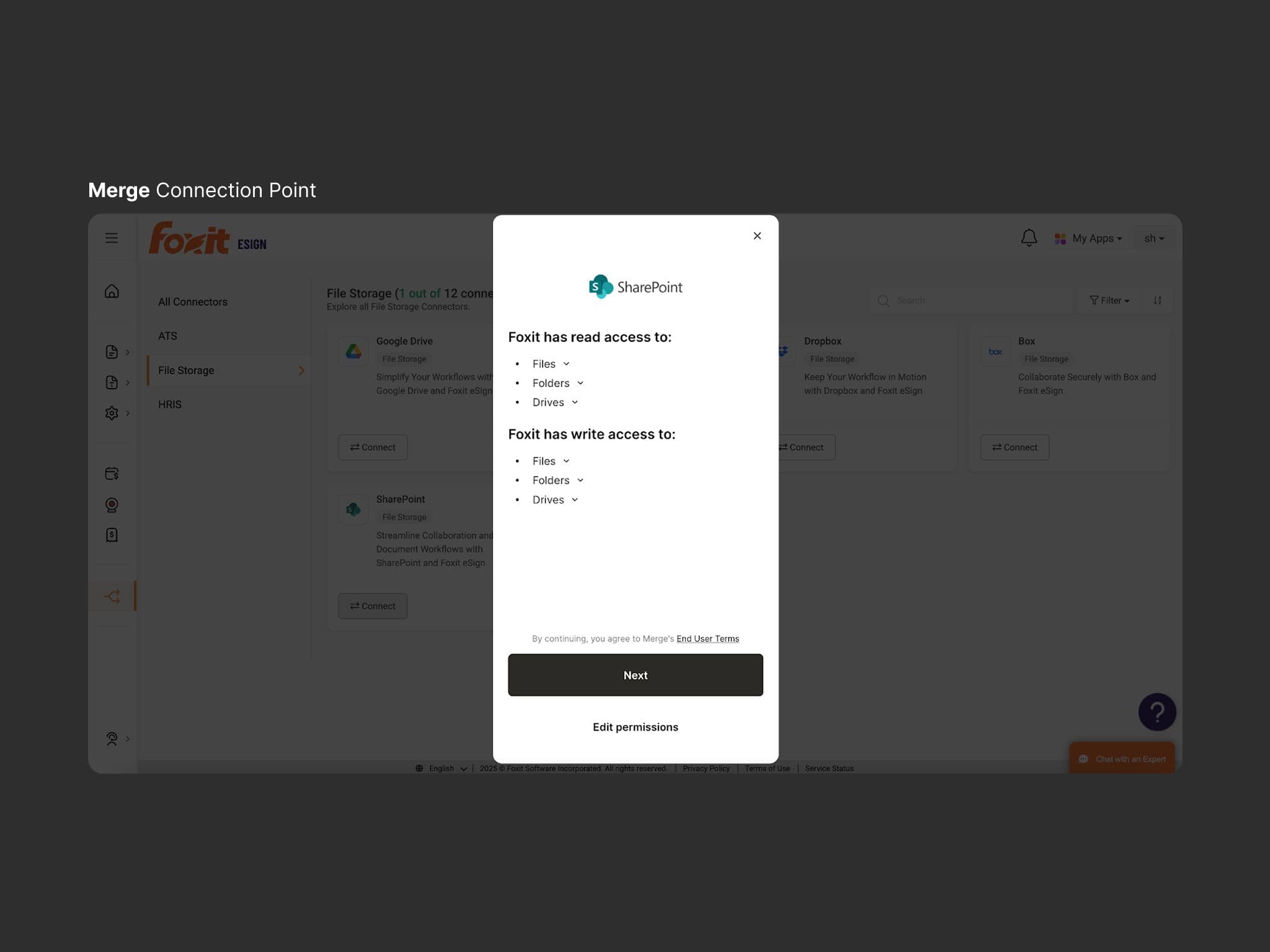
Admin permission scopes to align with organisational security and compliance
Approach / Process
1. Map the competitive field
I audited tier-one players and challengers, capturing the integration breadth, auth flows, pricing models (seat/doc/connector), who it’s built/marketed for, and how documents and audit trails move. I rated two-way connections, write-back behaviour, admin effort (UX), and compliance posture, then built matrices to visualise parity and gaps. The outcome of this work was that we could win as the lower-cost option with feature parity, so we prioritised two-way sync, storage write-back with certificates, and a simple admin setup. This also anchored the GTM narrative and sales battlecards.
2. Prototyping to align vision
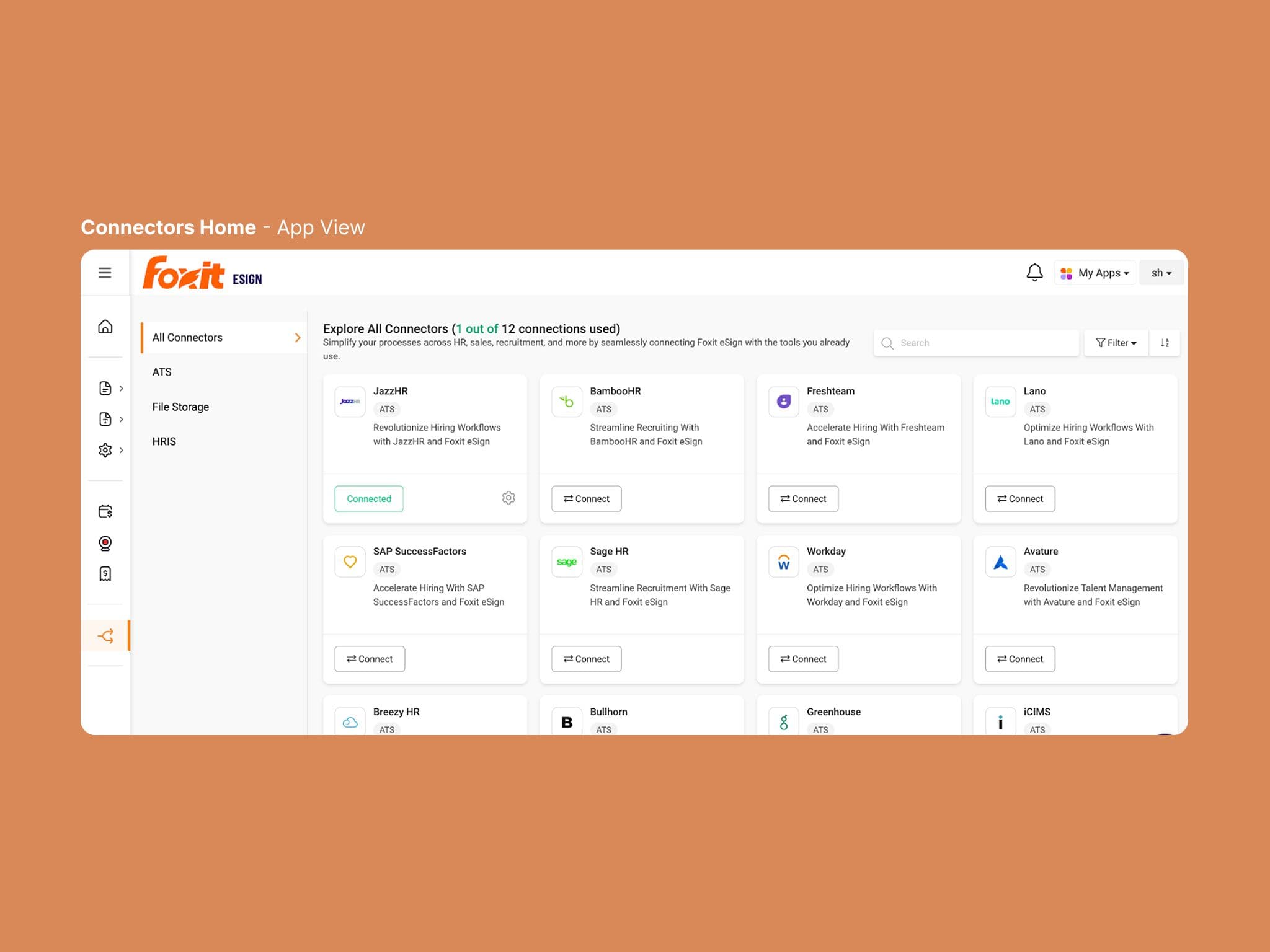
Integration/Connections in SaaS are terms clouded in functional ambiguity. Investigating the technology of our integration partner Merge.dev, I started with wireframes and a clickable prototype that showed real tasks: connect a data source, generate documents from HR/CRM fields, sign, and sync back. This cut through early confusion (API interface vs “send docs across platforms” vs “seamless two-way sync”). We workshopped live with frontend, marketing and sales until everyone was speaking the same language.
3. Design the actual Connectors flow end-to-end
Admins land in “Connectors,” pick a system, then authenticate via an embedded auth UI (Merge Link). We trigger an initial sync, then keep things current with event-based and periodic refreshes. For HRIS/ATS we map employees, offers, applications; for storage we map files, folders, drives.
5. Product spec, backlog and execution
I wrote a crisp PRD, broke it into user stories, set acceptance criteria, and ran daily sprints across two squads. The runsheet made progress obvious (green/amber/red per feature). We kept scope tight for v1: self-serve setup, templated document merge, eSign, and reliable write-back with audit artefacts.
6. Cross-org rollout planning
Nobody in the organisation had a view of the full path from “planned feature” to “available in the store and sellable.” I sat with SMEs from product, sales, accounts, ops, IT and mapped the whole flow - SKUs, pricing, provisioning, checks and balances, content, and lead times - into one living diagram. That let us raise tickets in each team’s JIRA and slot into their release cycles (online sales, marketing, app store, frontend, backend) instead of waiting and continual missed deadlines.
7. Enablement and documentation
I wrote the user and admin guides (Salesforce Knowledge) and internal playbooks (Confluence) so support and sales could self-serve, as well as prepped web-store assets and battlecards. This included updating the pricing models as management debated the best ways to bundle value across our holistic product offering. That documentation became the single source of truth as we continued to iterate towards launch.
8. Constraints & Risk Management
We faced risks and successfully mitigated around:
- •long opaque lead‑times for each department's release schedule (up to three months);
- •shifting technical constraints in upstream systems;
- •security permissions leakage across storage providers, data privacy in HRIS/ATS;
- •cross-team & enterprise dependencies for store, pricing and provisioning of the product.
Learnings / Reflections
1. The art of “enough” planning.
The PRD was tight, then pricing changed, packaging pivoted, or legacy constraints surfaced. I pressure-tested plans with both squads first. Armed with the process map, when the plan went to wider stakeholders, discussion was short and forward-moving.
Internally, the PRD became the “gold standard” document, praised for clarity and completeness.
2. Process clarity beats endless meetings
Mapping departmental hand‑offs was time well spent. Before this, getting a product into the online store was a black box and a headache for everyone. By mapping each team’s steps and required artefacts (SKUs, codes, checks, marketing), our submissions sailed through. It also meant each squad had the information required to submit valid tickets directly to the JIRA of other squads. Not only did this cut meetings and time to market, but it enhanced understanding, trust, revealed hidden bottlenecks and saved weeks of confusion and delays.
3. Shared vision starts with a shared interface
At the start, different teams imagined different products. A hands-on Figma prototype showing actual tasks (connect, merge, sign, sync) became our north star. It clarified what the product does (and what it doesn’t) so design, engineering, marketing and sales spoke the same language. Even when the requirements and functionality are “obvious”, Prototypes are worth the extra days spent in cross‑functional projects.